Product page
Friday launch
The Greenhouse Labs launch page can go public with email capture and setup preview.
Read-first production intelligence for vMix.
CuePilot MCP helps AI assistants inspect vMix state, explain live shows, diagnose routing and output risks, review scripts, and generate automation plans before anything changes in vMix.
Default
Review Mode
Package
Coming at launch
License
Source-available
The page is being prepared first so the public launch can coordinate the product story, GitHub visibility, npm package, and support channels without implying the package is installable early.
Product page
The Greenhouse Labs launch page can go public with email capture and setup preview.
GitHub repository
Visibility will change as part of the coordinated public launch.
npm package
@greenhouselabs/cuepilot-mcp will be announced when install is ready.
CuePilot MCP connects AI assistants to vMix state and curated production knowledge so operators can ask better questions before a rehearsal, stream, recording, or client show.
Read live vMix state, inputs, overlays, title fields, audio buses, tally, and production relationships before making recommendations.
Translate a preset into operator language: program, preview, likely roles, helper inputs, graphics, and review points.
Review audio routing, mix-minus patterns, output readiness, logs, connection issues, and saved-vs-live preset drift.
Generate reviewable VB.NET scripts and ordered API plans using actual input references without executing them in Review Mode.
CuePilot is built for safer AI-assisted production workflows. The default experience keeps the assistant in an advisory role and makes control boundaries visible.
Reads state, explains setup, diagnoses risks, validates scripts, and produces checklists or automation plans. It does not mutate vMix.
Exposes safer live-control tools only when the operator sets VMIX_CONTROL_MODE=true in the MCP client environment.
Requires VMIX_CONTROL_MODE=true and VMIX_HIGH_IMPACT=true for scripts, batch commands, streaming, recording, presets, output routing, and destructive changes.
CuePilot installs as an MCP package once @greenhouselabs/cuepilot-mcp is public on npm. Until then, these documented commands are shown as release-preview setup references.
Package
@greenhouselabs/cuepilot-mcp
Version
1.0.0
Runtime
Node.js 20+
Default Mode
Review Mode
Control Mode is not a first-run step. Only enable VMIX_CONTROL_MODE=true after Review Mode is working. High-Impact Control requires both VMIX_CONTROL_MODE=true and VMIX_HIGH_IMPACT=true.
First-run setup starts in Review Mode.
vMix Web Controller: vMix running, Web Controller enabled, default port 8088.
API reachability: MCP host can reach http://localhost:8088/api/.
MCP client: Claude Desktop, Claude Code, Cursor, or Codex.
First-run boundary: Trusted local/network use only; leave VMIX_CONTROL_MODE unset.
vMix Web Controller is unauthenticated. Do not expose it to the public internet.
Use this shape for MCP clients that read a server configuration file once the package is published.
{
  "mcpServers": {
    "vmix": {
      "command": "npx",
      "args": ["-y", "@greenhouselabs/cuepilot-mcp"],
      "env": {
        "VMIX_HOST": "localhost",
        "VMIX_HTTP_PORT": "8088",
        "VMIX_TCP_PORT": "8099"
      }
    }
  }
}Start with a read-only prompt.
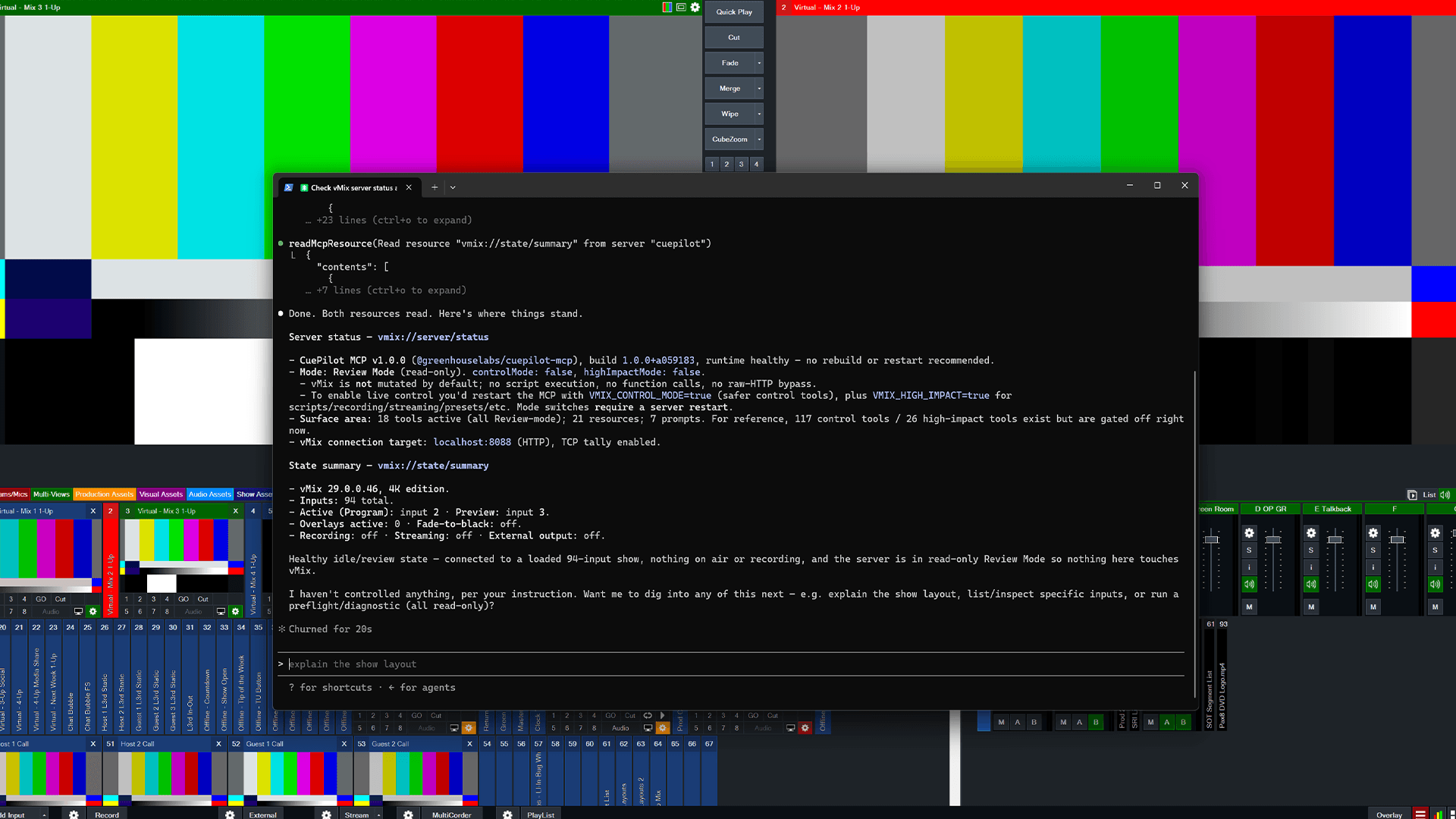
Use the vMix MCP. Read vmix://server/status and vmix://state/summary. Do not control vMix yet.server reports Review Mode
controlMode is false
highImpactMode is false
review tools only
vmix://state/summary returns current vMix state
no live-control tool is called
CuePilot is strongest when a user asks for inspection, explanation, diagnosis, or a reviewable plan. It can help a team turn a messy vMix setup into a checklist the operator can trust.
Ask CuePilot to explain the current preset, identify active and preview paths, summarize graphics and audio state, and call out anything worth checking before rehearsal.
Review buses, mute state, solo state, vMix Call routing, caller returns, and feedback risks before a remote guest hears the wrong mix.
Separate what vMix state can prove from what still needs operator verification: stream destination, recording path, audio feed, external output, and downstream hardware.
Generate or validate VB.NET scripts with stable input references, syntax checks, loop-safety warnings, assumptions, and rehearsal notes.
Review a saved .vmix file for scripts, triggers, audio evidence, and drift from the running show without writing to the preset.
Produce ordered vMix API plans and operator checklists before enabling any direct control surface.
CuePilot is for operators and builders who already know vMix is powerful, but want an AI assistant that can read the show, respect the control boundary, and produce reviewable next steps.
Setup details are visible, but install availability is not live yet.
Inline setup is visible now as a release-preview reference.
Commands become usable only after @greenhouselabs/cuepilot-mcp is published to npm.
GitHub visibility and npm publication remain coordinated release steps.
Review Mode will be the recommended first-run experience.
The source may be made available for review, learning, verification, debugging, and private internal modification under the CuePilot Source-Available License.
Redistribution, public forks, competing products, hosted managed offerings, and broader reuse require written permission from Greenhouse Ventures LLC.
CuePilot MCP integrates with vMix workflows through documented local interfaces. It is not affiliated with, endorsed by, or sponsored by vMix or StudioCoast Pty Ltd.
No. CuePilot MCP is source-available under the CuePilot Source-Available License. Greenhouse Ventures LLC is the legal owner and licensor, and Greenhouse Labs is the public brand.
Not by default. Review Mode is the default mode and is designed to inspect, explain, diagnose, validate, and plan. Direct control requires explicit environment-variable opt-in, and high-impact control requires a second gate.
CuePilot is designed to redact sensitive values from preset and log-derived output, including stream keys, tokens, passwords, and vMix Call secrets. Operators should still avoid exposing vMix Web Controller to the public internet and should review any shared logs or presets carefully.
No. CuePilot MCP is an independent Greenhouse Labs integration for vMix workflows. It is not affiliated with, endorsed by, or sponsored by vMix or StudioCoast Pty Ltd.
Join the launch list for availability updates, early notes, and official setup details when the GitHub and npm release are ready.