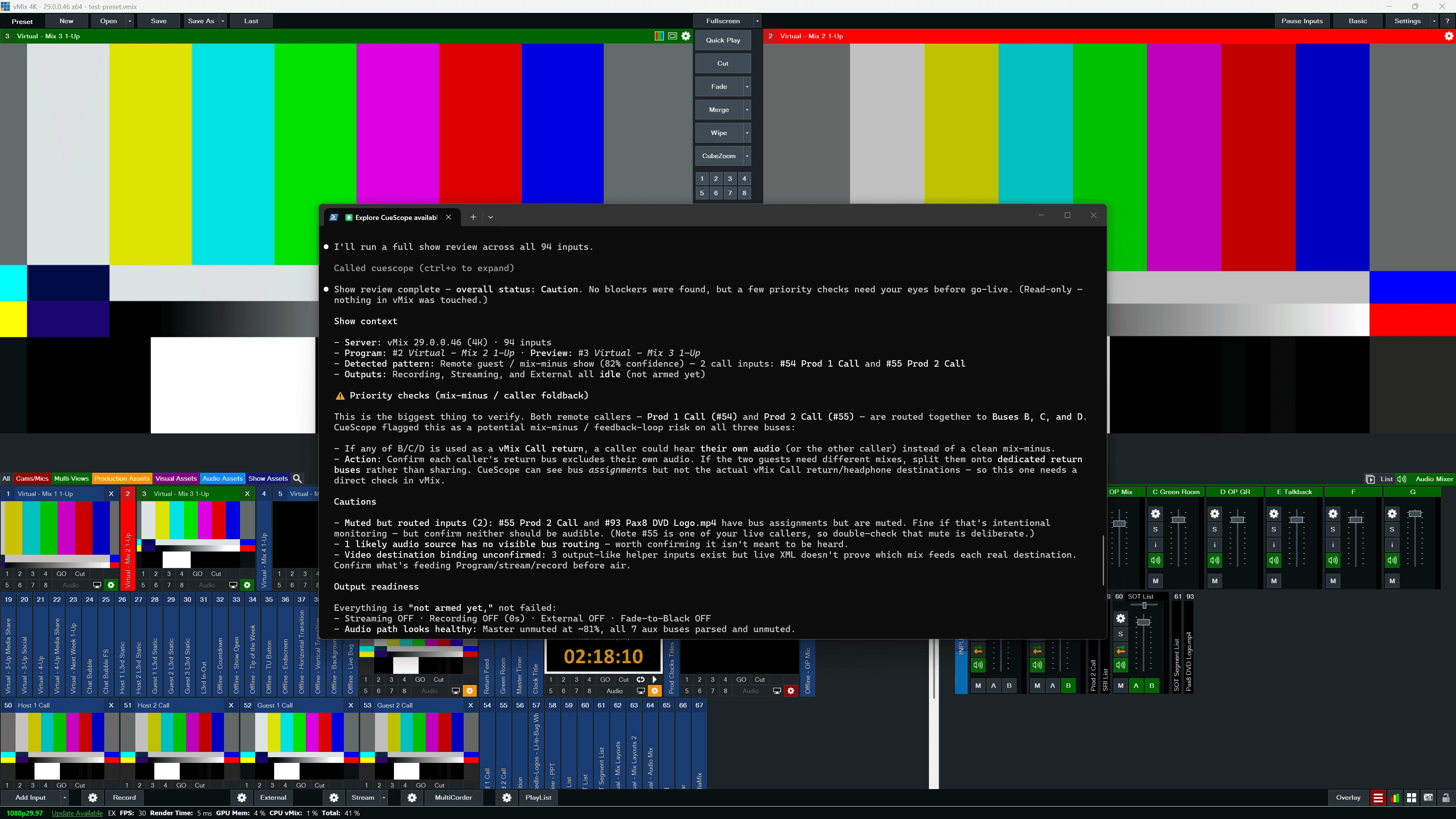
CueScope is a source-available, read-first MCP server from Greenhouse Labs for workflows compatible with vMix. It gives AI assistants safe production intelligence for live-production workflows: inspecting live show state, explaining inputs and title fields, diagnosing audio and routing issues, reviewing saved .vmix presets, reviewing scripts and triggers, generating show checklists, and producing reviewable automation plans before anything changes.
CueScope is available now as @greenhouselabs/cuescope-mcp@1.0.2 on npm. Install it with npm install -g @greenhouselabs/cuescope-mcp, or connect the published package directly from an MCP client with npx. The source-available GitHub repository is public for review, setup guidance, and issue tracking.
Why It Exists
AI assistants can be useful in live production, but only if they understand the show before trying to change it. CueScope starts with Review Mode: read the current state, separate observed facts from assumptions, explain the setup in operator language, and produce reviewable next steps.
What It Reviews
- Live show state, inputs, active and preview paths, overlays, title fields, and tally
- Audio routing, buses, mutes, solo state, vMix Call patterns, and mix-minus risks
- Recording, streaming, external output, video path, audio path, and destination blind spots
- Saved
.vmixpreset files, scripts, triggers, saved-vs-live drift, and redacted preset metadata - Title/countdown metadata and title data-source bindings that operators need to verify
- VB.NET scripts, targeted trigger/script reference summaries, and API plans before they are copied into an operator workflow
- Connection issues, pasted logs, and safe next checks without exposing production secrets
Safety Model
Review Mode is the default. It exposes 18 review-only tools and inspects, explains, diagnoses, validates, and plans without executing scripts, calling vMix shortcut functions, saving presets, starting streams, changing audio, or mutating the show.
Control Mode is available only when an operator explicitly enables VMIX_CONTROL_MODE=true. High-Impact Control requires both VMIX_CONTROL_MODE=true and VMIX_HIGH_IMPACT=true for workflows such as recording, streaming, batch commands, scripts, presets, output routing, destructive input changes, show-building, and replay recording. The server has 135 known tools, with control and high-impact tools hidden behind explicit gates.
Example Workflows
- Explain the current show like a technical director preparing for rehearsal.
- Diagnose remote guest audio and flag likely mix-minus problems.
- Review whether recording, streaming, and external outputs are ready for operator verification.
- Generate a safe lower-third API plan without executing it.
- Validate a vMix VB.NET script before pasting it into vMix.
- Compare before and after XML snapshots and summarize the production meaning of the change.
v1.0.2 Update
- Live-first input inspection
- Saved GT/title countdown metadata parsing
- Title data-source binding detection
- Targeted trigger/script reference summaries
Launch Notes
CueScope is published under the Greenhouse Labs brand and is legally owned and licensed by Greenhouse Ventures LLC. It is source-available, not open source. It is independent software for workflows compatible with vMix and is not affiliated with, endorsed by, or sponsored by vMix or StudioCoast Pty Ltd. vMix is a trademark of its respective owner.
View the product page, open the npm package, review the public repository, or read the v1.0.2 release.